Connecting GitHub to Deployable Apps
SECTION 1 — Why Deployment Matters
Right now, your AI app only runs on your computer.
That means:
- nobody else can use it
- nobody can test it
- nobody can share it
Real AI applications need deployment.
Deployment means:
making your application accessible online through a public URL.
This is one of the biggest transitions in becoming an AI developer.
You are moving from:
“local experiments”
to
“real usable applications.”
SECTION 2 — What Learners Will Build
In this lesson, we will:
- connect our project to GitHub
- upload our code
- deploy the app using Streamlit Community Cloud
- generate a public app link
The final result will be a working AI application anyone can access from a browser.
SECTION 3 — Project Setup
Folder Structure
deployable_ai_app
app.py
requirements.txt
.streamlit
secrets.toml
requirements.txt
streamlit
google-generativeai
app.py
Use the previously created working Gemini chat app.
Important Setup Note
Before recording:
- test app locally
- confirm Gemini API works
- confirm GitHub account works
- confirm Streamlit Cloud login works
SECTION 4 — Create GitHub Repository
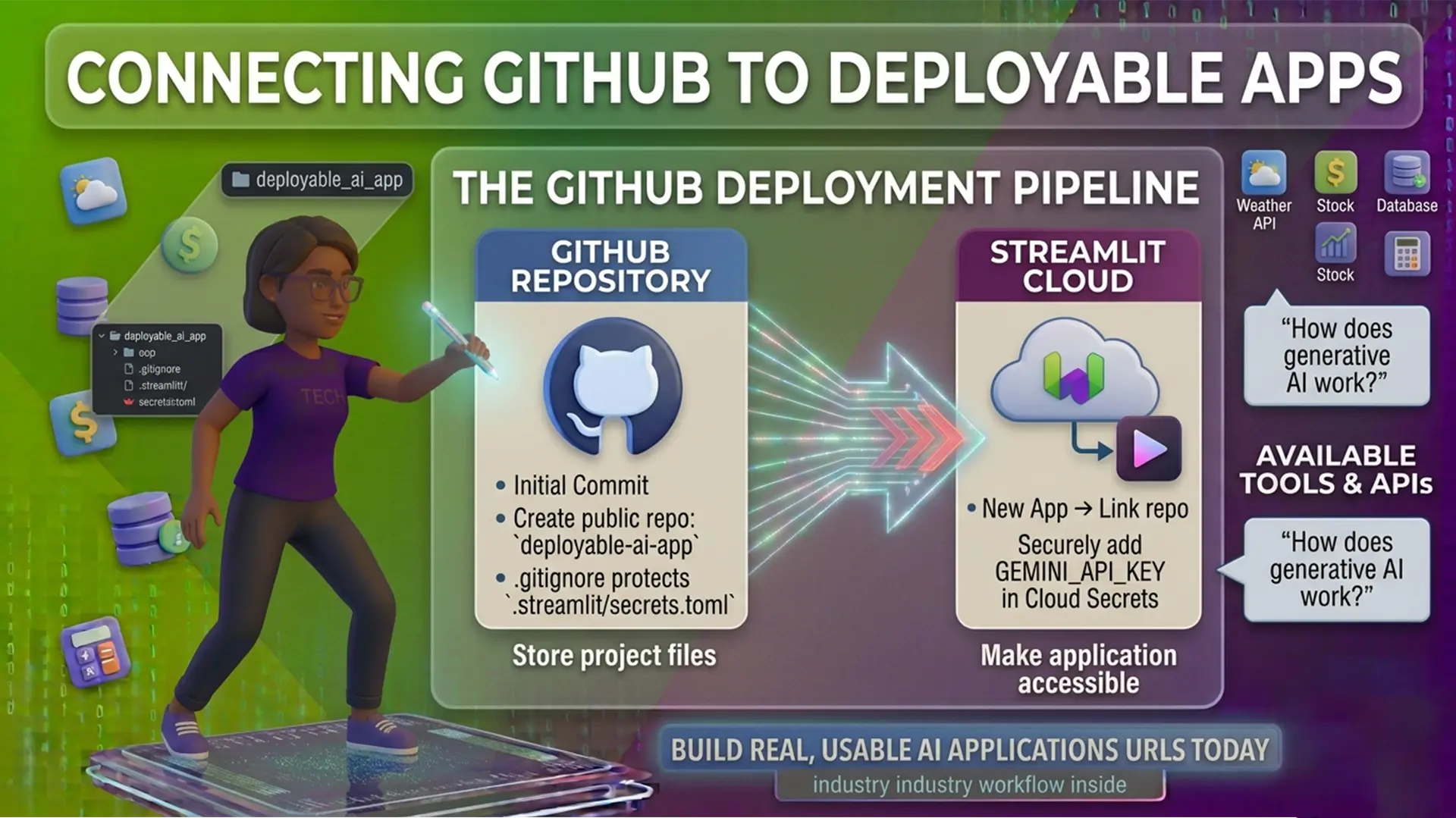
GitHub acts like a cloud storage system for code.
Developers use it to:
- store projects
- collaborate
- deploy apps
- manage version history
Now let’s create a repository.
Step-by-Step Actions
Scene Checklist
Scene 1 — Open GitHub
Go to:
https://github.com
Scene 2 — Create Repository
Click:
- New Repository
Repository name:
deployable-ai-app
Select:
- Public
Click:
- Create Repository
SECTION 5 — Connect Local Project to GitHub
Now we connect our local project folder to GitHub using Git commands.
This allows GitHub to track and store our project files.
Terminal Commands
Open terminal inside project folder.
Run:
git init
Then:
git add .
Then:
git commit -m “Initial commit”
Now connect GitHub repository:
git remote add origin YOUR_GITHUB_REPOSITORY_URL
Push files:
git branch -M main
git push -u origin main
Notice how GitHub shows an error? It is because it has detected the API key.
SECTION 6 — Important Security Rule
Never upload your secrets file to GitHub.
Your Gemini API key must remain private.
Let’s fix this!
Create a file named:
.gitignore
Add:
.streamlit/secrets.toml
This prevents sensitive files from being uploaded publicly.
SECTION 7 — Deploy Using Streamlit Community Cloud
Now we will deploy the app publicly using Streamlit Community Cloud.
This platform connects directly to GitHub.
Whenever your GitHub code changes, the app updates automatically.
Step-by-Step Actions
Go to:
https://share.streamlit.io
Deployment Steps
- Sign in with GitHub
- Click:
- New App
- Select repository:
- deployable-ai-app
- Select branch:
- main
- Select file:
- app.py
- Click:
- Deploy
It shows that the API key is missing. That’s because our deployed app still needs the Gemini API key.
We need to securely add it inside Streamlit Cloud secrets.
SECTION 8 — Add Gemini API Key to Streamlit Cloud
Steps
Inside Streamlit Cloud:
- open App Settings
- open Secrets
Paste:
GEMINI_API_KEY = “YOUR_API_KEY”
Save.
Reboot app.
SECTION 9 — Final Deployment Demo
Your app is now live on the internet.
Anyone with the link can use your AI application.
This is a major milestone in your AI development journey.
Demo Prompts
What is generative AI?
Then:
Explain it like I am a beginner.
SECTION 10 — Real Product Perspective
Most modern AI startups use workflows very similar to this:
- GitHub for source control
- cloud deployment platforms
- API-based AI models
- public web interfaces
You are now following a real industry workflow.
SECTION 11 — Lesson Recap
Recap Slide
You learned how to:
Create a GitHub repository
Push code to GitHub
Protect API keys
Deploy a Streamlit app
Create a public AI application
Citations :
This content is locked
Upgrade to a Reading Program subscription or purchase the AI Foundation course to unlock this content.
Hashtags :
- #GPSforLifeAndCareer
- #ConsciousIntelligence
- #Kidswiki
- #MindInTheMaking
- #RelevanceInEducation
- #MeaningfulLearning
- #RealWorldSkills
- #SafeContent
- #360DegreeDevelopment
- #Skillioma
- #BeyondCurriculum
- #SkillsBeyondSchool